Tutorials › Turn an NPC into an Enemy at Nightfall
How to Turn an NPC into an Enemy at Nightfall in Godot 4
Two bodies of one person, a clip that hands one to the other with no jump, and a darkness value.
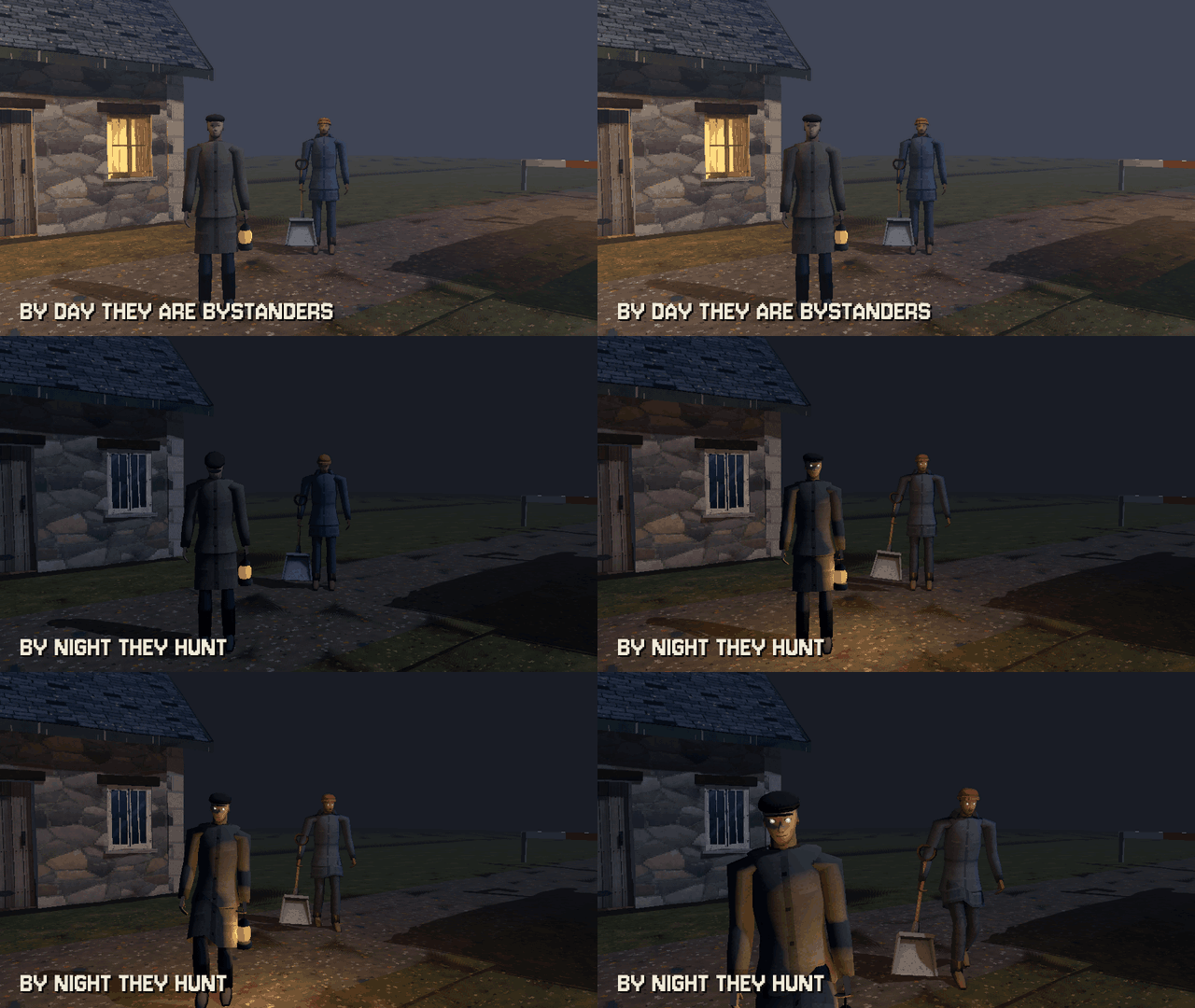
The scariest enemy is the one the player walked past an hour ago. A villager is two instances of one model: Day, an ordinary person with its day clips, and Night, the enemy; only one shows at a time. When the darkness from your sky passes turn_at, the day body plays Turn, a clip made to end on the night body's first Idle frame, and on that last frame the night body takes its place in the same pose. At dawn the day body steps back in; a hidden body is also stopped, so it costs nothing.
Script: night_turn.gd (MIT) · Godot 4.3 or newer · its folder on GitHub
How to use it
- Add a
Node3Dand attachnight_turn.gd. Give it two children,DayandNight: two instances of one villager's model, each with its own AnimationPlayer. - The model's clips: the day's (
Day_Idleby default),Turn, which ends on the night's first Idle frame, and the night's (Idle). Rename them inday_idle,turn_clipandnight_idle. - Set
darknessfrom your sky, 0 by day to 1 at night. The villager turns atturn_atand comes back atdawn_at; in between it stays as it is, so a cloud over the moon does not flip it. - Connect
turned(true at nightfall, false at dawn) and give the night body your enemy script.
What it needs
- Godot 4.3 or newer (the Compatibility renderer is enough).
- A rigged character with day clips, a Turn clip and night clips on one skeleton.
Try it free
The PSX Bystanders NPC Pack Free Sampler has the NPC layer the day body runs on; the villagers themselves, with their day clips, Turn and the night's, are the Villagers bonus in PSX Bystanders NPC Pack. The script works on any rigged character with a day Idle, a Turn and a night Idle on one skeleton.
How it was tested
In Godot 4.3 and 4.7.2, with the ploughman of the Villagers bonus: by day the day body shows; in the dark it plays Turn and the night body takes over in the same pose; at dawn the day body is back; the signal fires both ways.
The code
class_name NightTurn
extends Node3D
## How to Turn an NPC into an Enemy at Nightfall in Godot 4
## Cordatix Godot 4 PSX tutorials, MIT licensed: https://github.com/GoldenSparrow-Dev/cordatix-godot-psx-tutorials
## Written for: https://cordatix.itch.io/psx-bystanders-npc-pack
## Turn a villager at nightfall in Godot 4.3+: by day one body, by night another, handed over in the same pose.
## Give this node two children, "Day" and "Night": two instances of one villager's model, each with its own
## AnimationPlayer (a PSX Horror Villagers GLB carries both bodies' clips: the day's as Day_<name>, the night's, and
## Turn). The day body plays Turn, a clip that ends on the night's first Idle frame; on that last frame the night body
## takes its place, so the hand-over shows no jump. Set `darkness` from your sky, 0 (day) to 1 (night): the villager
## turns when it reaches turn_at and comes back when it falls to dawn_at (in between it stays as it is).

signal turned(night: bool)

@export_range(0.0, 1.0) var darkness := 0.0
@export var turn_at := 0.6
@export var dawn_at := 0.35
@export var day_idle := "Day_Idle"
@export var turn_clip := "Turn"
@export var night_idle := "Idle"


var is_night := false
var _turning := false
@onready var day: Node3D = $Day
@onready var night: Node3D = $Night

func _ready() -> void:
	_play(day, day_idle)
	_play(night, night_idle)
	_show(day, night)


func _physics_process(_delta: float) -> void:
	if _turning:
		return
	if not is_night and darkness >= turn_at:
		_turn()
	elif is_night and darkness <= dawn_at:
		_back()


func _turn() -> void:
	_turning = true
	var ap := _anim(day)
	if ap and ap.has_animation(turn_clip):
		ap.play(turn_clip, 0.2)
		await ap.animation_finished          # Turn's last frame: the night's first Idle pose
	night.global_transform = day.global_transform
	_play(night, night_idle)
	_anim(night).seek(0.0, true)
	_show(night, day)
	is_night = true
	_turning = false
	turned.emit(true)


func _back() -> void:
	day.global_transform = night.global_transform
	_play(day, day_idle)
	_show(day, night)
	is_night = false
	turned.emit(false)

func _show(on: Node3D, off: Node3D) -> void:
	off.visible = false
	off.process_mode = Node.PROCESS_MODE_DISABLED
	on.visible = true
	on.process_mode = Node.PROCESS_MODE_INHERIT


func _play(body: Node3D, clip: String) -> void:
	var ap := _anim(body)
	if ap and ap.has_animation(clip):
		ap.play(clip)


func _anim(body: Node3D) -> AnimationPlayer:
	return body.find_child("AnimationPlayer", true, false) as AnimationPlayer
The devlog and the pack
The step-by-step walkthrough comes as a devlog on itch.io on 1 December 2026; this page is the tutorial until then. It is written for PSX Bystanders NPC Pack, a PS1-style asset pack by Cordatix for Godot 4, Unity, Unreal and Blender.